DTF & Shop Cost
Square Inches to Square Feet Converter
Convert design area between in² and ft² for film and material pricing.
New here? Jump to how it works · FAQ
How detailed?
Basic = fastest path. Standard = more control. Advanced = full shop detail.
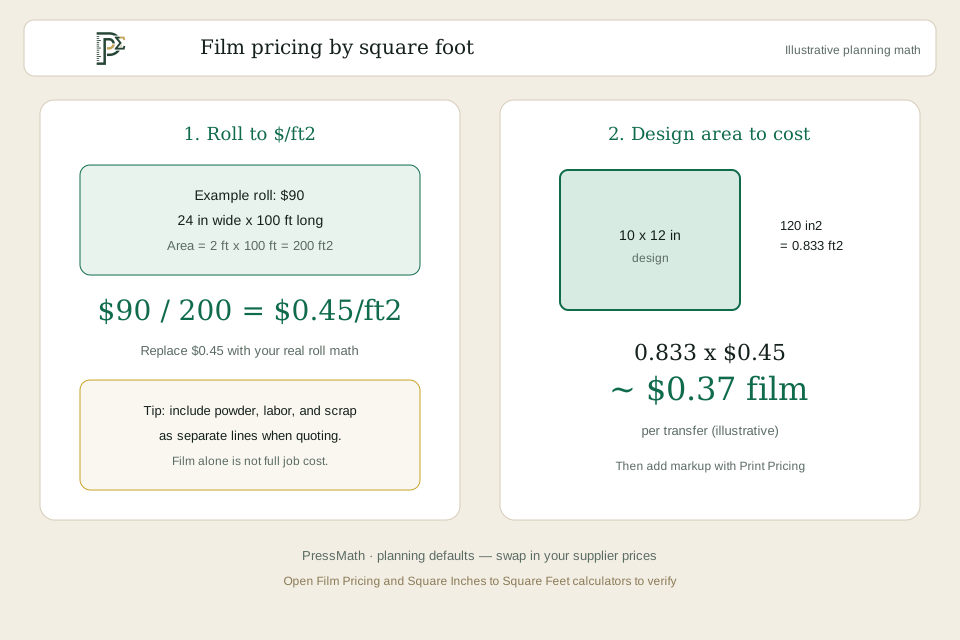
Film, vinyl and some substrate pricing is quoted per square foot while artwork lives in inches. Convert width × height into square inches, then into square feet, so material cost lines up with how you buy rolls and sheets.
This is the bridge between design size and DTF/vinyl cost calculators.
This is the bridge between design size and DTF/vinyl cost calculators.
How it works / formula
Calculation steps
- Area (in²) = width_in × height_in.
- Area (ft²) = in² ÷ 144.
- Multiply ft² by your film or vinyl $/ft² to get material cost before labour and waste. For nested jobs, use gang-sheet fill to share sheet area across designs.
Worked example
Example (illustrative)
- A 10 × 12 in design is 120 in² → 120 ÷ 144 = 0.833 ft². At $1.80/ft² film, material is about $1.50 before waste and ink.
Assumptions & limitations
This calculator provides an estimate for planning and quoting. Actual results vary with supplier pricing, ink coverage, waste, labour rates, equipment and marketplace fee changes. Always verify critical numbers before production. See the disclaimer.
Use with
| Tool | Purpose |
|---|---|
| DTF Cost Calculator | Turn ft² into film $ |
| Gang Sheet Calculator | Plan sheet fill |
Frequently asked questions
Is this the same as fabric yards?
No — yards need width of the roll. This is pure area conversion.
Why divide by 144?
One square foot is 12 × 12 = 144 square inches.
Do I include bleed in the area?
If you print bleed or a cut margin, include that rectangle — you are buying that film whether the art uses it or not.
Is roll waste included?
Not automatically. Add waste % in your cost calculator or pad $/ft² after you measure scrap.
Embed this calculator
Add this tool to your shop site or blog. The snippet includes iframe auto-height (origin-checked postMessage). Embed URLs are noindex; the canonical URL stays this calculator page.
Improve this tool
Stuck, confused, or missing a field? Tell us — short notes are enough. This goes to the PressMath team, not a public comments thread.
Related tools
Related guides
Keep exploring
More in DTF & Shop Cost · Resources hub · Guides · FAQ · Disclaimer
Share this result
Share a short caption + link, or a result card image. Social apps get text/link; use Share image or Download card for a simple sheet graphic.
Nothing posts automatically. Image share works best on phones; desktop downloads the PNG if needed.