Image & Print Size
DPI Calculator
Find print DPI from pixel count and finished print size.
New here? Jump to how it works · FAQ
How detailed?
Basic = fastest path. Standard = more control. Advanced = full shop detail.
DPI (dots per inch) connects pixel dimensions to physical print size. Enter width, height and DPI to see the print inches — or reverse the problem when a client asks for a specific size at 300 DPI. This is the first check before you send art to a RIP, DTF printer or large-format device.
Soft prints are usually under-resolved for the final size, not a mysterious ink problem. Oversized pixel files at tiny print sizes waste RIP time without improving press quality.
Soft prints are usually under-resolved for the final size, not a mysterious ink problem. Oversized pixel files at tiny print sizes waste RIP time without improving press quality.
How it works / formula
Calculation steps
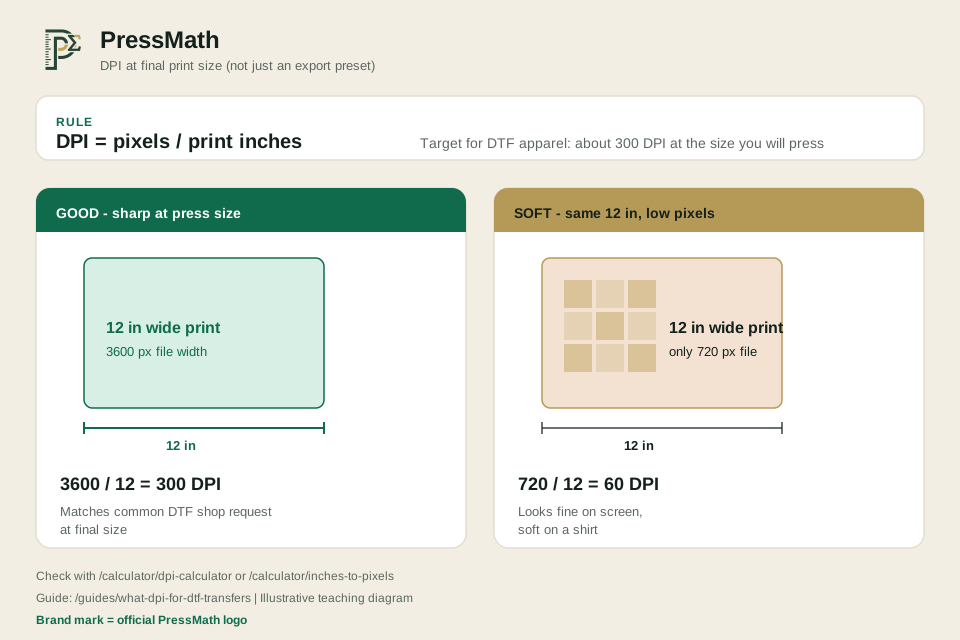
- Print inches = pixels ÷ DPI.
- Required pixels = inches × DPI.
- Most apparel and DTF work targets 300 DPI at the final pressed size. Signage and banners often run lower DPI because viewing distance is farther. Always match the DPI assumption to the device and distance.
Worked example
Example (illustrative)
- A 3600 × 4800 px file at 300 DPI prints at 12 × 16 inches. If the client needs 14 inches wide at 300 DPI, you need 4200 px across — upscaling a small file will not invent detail.
Assumptions & limitations
This calculator provides an estimate for planning and quoting. Actual results vary with supplier pricing, ink coverage, waste, labour rates, equipment and marketplace fee changes. Always verify critical numbers before production. See the disclaimer.
Resolution check
| DPI result | Meaning |
|---|---|
| 300+ | Strong for close-view print |
| 150–299 | Often OK for posters / distance |
| Under 150 | Likely soft or pixelated up close |
Frequently asked questions
Can I upscale a low-DPI file?
Software can invent pixels, but quality varies. For paid client work, start from a high-resolution source when possible.
Do I calculate width and height separately?
Yes. Use matching sides (width pixels with width inches).
Is 300 DPI mandatory for DTF?
It is the common production target. Some printers accept 200–250 DPI for large soft designs, but 300 DPI at final size is the safe default for apparel detail.
Does higher DPI always look better?
Not past what the printer and media can resolve. A 600 DPI shirt file is usually wasted pixels if the press and film are tuned for ~300 DPI artwork.
Should I change DPI in Photoshop without resampling?
Changing DPI metadata without resampling only changes the tagged print size. To add or remove pixels you must resample — and upscaling cannot recover lost detail.
Embed this calculator
Add this tool to your shop site or blog. The snippet includes iframe auto-height (origin-checked postMessage). Embed URLs are noindex; the canonical URL stays this calculator page.
Improve this tool
Stuck, confused, or missing a field? Tell us — short notes are enough. This goes to the PressMath team, not a public comments thread.
Related tools
Related guides
Keep exploring
More in Image & Print Size · Resources hub · Guides · FAQ · Disclaimer
Share this result
Share a short caption + link, or a result card image. Social apps get text/link; use Share image or Download card for a simple sheet graphic.
Nothing posts automatically. Image share works best on phones; desktop downloads the PNG if needed.