DTF & Shop Cost
DTF Cost Calculator (Basic & Advanced)
Two modes: Basic fast quote, or Advanced true-cost with CMYK/white ink, film roll, powder, electricity, labour, overhead, maintenance, waste and packaging.
New here? Jump to how it works · FAQ
How detailed?
Basic = fastest path. Standard = more control. Advanced = full shop detail.
This calculator has two modes.
Basic mode — fast quote from design size plus film $/ft², ink, powder, labour and waste. Suggested sell = unit cost × markup.
Advanced mode includes:
• CMYK ink (ml × $/L)
• White ink (ml × $/L)
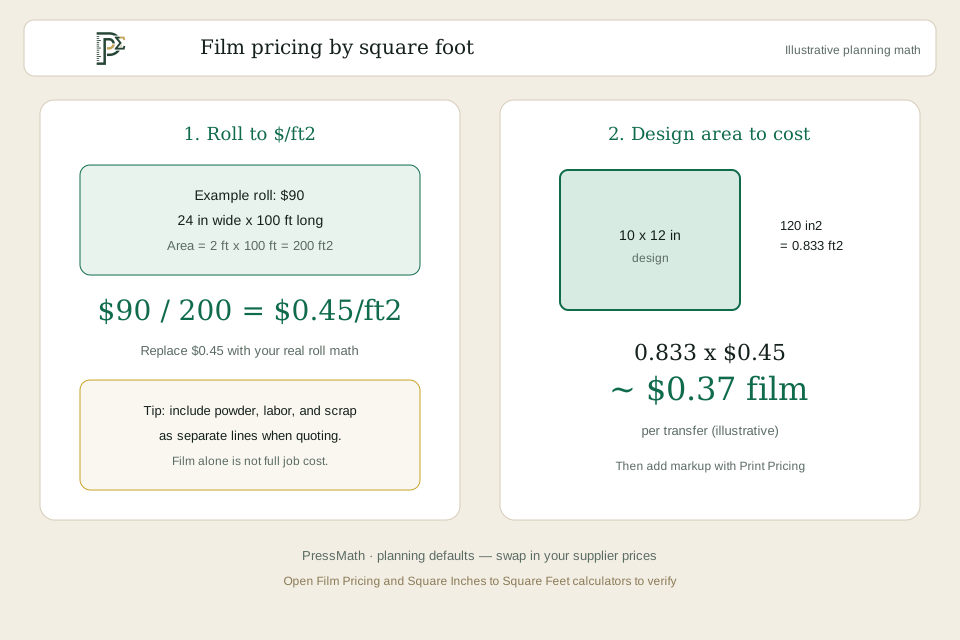
• Film roll economics (roll width, length and price → $/ft²)
• Powder (grams × $/kg)
• Electricity (watts × press time × $/kWh)
• Labour (press seconds × $/hr)
• Overhead per print
• Maintenance per print
• Waste / reprint buffer
• Packaging per print
• Target profit margin pricing (sell = true cost ÷ (1 − margin%))
Use Basic for a quick estimate. Switch to Advanced when you need a truer shop cost before you publish a price. Results are planning estimates — verify against supplier invoices and press logs.
Basic mode — fast quote from design size plus film $/ft², ink, powder, labour and waste. Suggested sell = unit cost × markup.
Advanced mode includes:
• CMYK ink (ml × $/L)
• White ink (ml × $/L)
• Film roll economics (roll width, length and price → $/ft²)
• Powder (grams × $/kg)
• Electricity (watts × press time × $/kWh)
• Labour (press seconds × $/hr)
• Overhead per print
• Maintenance per print
• Waste / reprint buffer
• Packaging per print
• Target profit margin pricing (sell = true cost ÷ (1 − margin%))
Use Basic for a quick estimate. Switch to Advanced when you need a truer shop cost before you publish a price. Results are planning estimates — verify against supplier invoices and press logs.
How it works / formula
Calculation steps
- Basic mode
- Design area (ft²) = (width × height) ÷ 144
- Film cost = area × film $/ft²
- Materials = film + ink + powder
- Waste buffer = materials × waste %
- Unit cost = materials + waste + labour
- Suggested sell price = unit cost × markup (default 2.5×)
- Advanced mode
- Film $/ft² from roll = roll price ÷ ((roll width in ÷ 12) × roll length ft)
- Film cost = design area ft² × film $/ft² from roll
- CMYK ink cost = (CMYK ml ÷ 1000) × CMYK $/L
- White ink cost = (white ml ÷ 1000) × white $/L
- Powder cost = (powder g ÷ 1000) × powder $/kg
- Labour = labour $/hr × (press seconds ÷ 3600)
- Electricity = (watts ÷ 1000) × (press seconds ÷ 3600) × $/kWh
- Materials = film + CMYK + white + powder
- Waste buffer = materials × waste %
- True unit cost = materials + waste + labour + electricity + overhead + maintenance + packaging
- Suggested sell price = true unit cost ÷ (1 − target margin %)
Worked example
Example (illustrative)
- Basic mode example
- Design: 10 × 12 in → 120 in² → 0.833 ft²
- Film at $0.45/ft² ≈ $0.37
- Ink $0.35 + powder $0.15 = $0.50
- Materials ≈ $0.87 → with 10% waste ≈ $0.96
- Plus $0.75 labour → about $1.71 unit cost
- Suggested sell at 2.5× markup → about $4.28
- Advanced mode example
- Same 10 × 12 in design (0.833 ft²)
- 24 in × 100 ft roll at $45 → film ≈ $0.225/ft² → film ≈ $0.19
- CMYK 1.2 ml at $80/L ≈ $0.10; white 2.5 ml at $90/L ≈ $0.23
- Powder 3 g at $18/kg ≈ $0.05
- Materials ≈ $0.56 → 10% waste ≈ $0.06
- Labour 15 sec at $18/hr ≈ $0.08; electricity ~$0.001; overhead $0.20; maintenance $0.05; packaging $0.10
- True cost ≈ $1.04 → at 40% margin sell ≈ $1.74
Assumptions & limitations
This calculator provides an estimate for planning and quoting. Actual results vary with supplier pricing, ink coverage, waste, labour rates, equipment and marketplace fee changes. Always verify critical numbers before production. See the disclaimer.
Basic vs Advanced — when to use which
| Mode | What it covers | Best for |
|---|---|---|
| Basic | Film $/ft² + lump ink/powder/labour + waste + markup | Quick quotes, social pricing, first pass |
| Advanced | CMYK + white ink, film roll, powder g, electricity, labour rate, overhead, maintenance, packaging, margin % | Shop floor costing and profitable price floors |
| Either → Print Pricing | Take unit cost into markup vs margin quote tool | When you also need setup fees and batch totals |
Frequently asked questions
What is the difference between Basic and Advanced mode?
Basic uses per-print lump costs and a markup multiplier. Advanced builds true cost from CMYK/white ink usage, film roll economics, powder grams, electricity, labour rate, overhead, maintenance, packaging and a target profit margin.
Should blank garment cost be included?
Add garment cost separately when quoting finished shirts. This tool focuses on transfer / decoration production cost.
Why is waste percentage important?
Misprints, purge and edge trim eat margin. A 5–15% buffer is common until you measure your real waste.
How do I calibrate Advanced ink and powder?
Pull ml from your RIP or ink counter for a typical design, and weigh powder for a few prints. Replace the defaults — that is what makes Advanced useful.
Does Advanced packaging mean the bag or the garment?
Use packaging for the share of bag, sleeve, label or shipper tied to one transfer. Garment blanks stay separate.
Embed this calculator
Add this tool to your shop site or blog. The snippet includes iframe auto-height (origin-checked postMessage). Embed URLs are noindex; the canonical URL stays this calculator page.
Improve this tool
Stuck, confused, or missing a field? Tell us — short notes are enough. This goes to the PressMath team, not a public comments thread.
Related tools
Related guides
Keep exploring
More in DTF & Shop Cost · Resources hub · Guides · FAQ · Disclaimer
Share this result
Share a short caption + link, or a result card image. Social apps get text/link; use Share image or Download card for a simple sheet graphic.
Nothing posts automatically. Image share works best on phones; desktop downloads the PNG if needed.