Image & Print Size
Sticker Sheet Layout Tips (Fit More Without Ruining Cuts)
Plan sticker sheets with margins, gaps and optional 90° rotation. Includes a worked 12×12 example that matches the PressMath layout calculator.
Direct answer: Treat a sticker sheet as a rectangular grid. Subtract cutter margins from both sides, leave a consistent gap between stickers, count how many widths and heights fit, then multiply. PressMath also tries a 90° rotation and keeps the higher count. That is a planning estimate — not true nesting for irregular shapes.
Why grid packing works (and where it fails)
Kiss-cut and die-cut jobs need predictable spacing so the blade does not clip neighbours. A regular gap also makes weeding and packing quotes faster. Grid packing fails to beat nesting software when shapes are irregular, when you mix many sizes on one sheet, or when registration marks consume unexpected space.
Step-by-step layout
- Choose finished sticker size (include printed bleed that must stay on the sticker).
- Choose sheet size (letter, 12×12, roll width × length, etc.).
- Set a cutter-safe margin from each sheet edge (PressMath default: 0.25 in).
- Set an equal gap between stickers (PressMath default: 0.125 in).
- Compute usable area, columns and rows (formula below).
- Optionally rotate 90° and keep the better count.
- Add bleed/safe-area on the art file with the Bleed & Safe Area Calculator.
- Confirm count in the Sticker Sheet Layout Calculator before you quote.
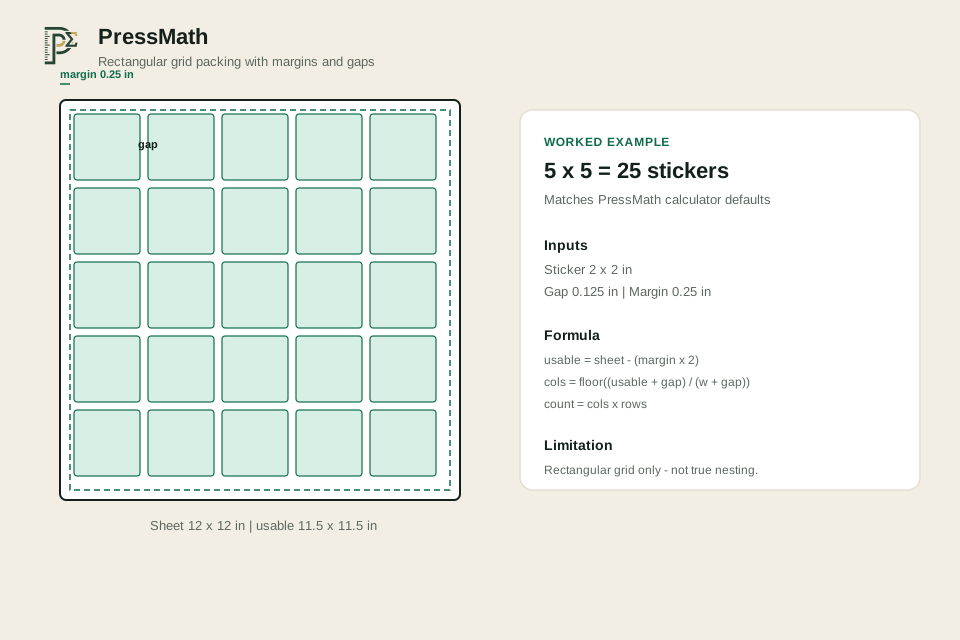
The diagram at the top of this page shows the same defaults as the calculator (margin, gap and 5×5 grid).
Formula (same as the calculator)
All units in inches:
- usable width = sheet width − (margin × 2)
- usable height = sheet height − (margin × 2)
- columns = floor( (usable width + gap) ÷ (sticker width + gap) )
- rows = floor( (usable height + gap) ÷ (sticker height + gap) )
- count = columns × rows
Repeat with sticker width/height swapped for a 90° rotation. Keep the orientation with the higher count.
Assumption (labeled): equal gaps, axis-aligned rectangles, no scrap nesting between odd shapes. Kiss-cut plots may need extra margin for registration marks — subtract that from usable area first.
Worked example (matches calculator defaults)
Sheet 12 × 12 in, sticker 2 × 2 in, gap 0.125 in, margin 0.25 in:
- usable = 12 − (0.25 × 2) = 11.5 in on each side
- columns = floor( (11.5 + 0.125) ÷ (2 + 0.125) ) = floor(11.625 ÷ 2.125) = 5
- rows = same math = 5
- count = 5 × 5 = 25 stickers per sheet
Because the sticker is square, rotation does not change the count. For a 3 × 2 in sticker on the same sheet, run both orientations — one usually fits more.
Practical layout guidance
- Keep critical text inside a safe inset from the cut path (bleed outside, type inside).
- Do not crowd the sheet edge where grippers or cutter clamps live.
- Mixed sizes: group same heights into rows before mixing; mixed freeform nesting needs dedicated software.
- Price customers on sticker count if that is what they buy — cost the job from sheets used internally.
Common mistakes
- Promising a pack count from “looks like it fits” without the floor division.
- Ignoring registration marks that shrink usable area.
- Using zero gap on kiss-cut vinyl — blades and weed need space.
- Treating grid util% as RIP nesting util%.
After you know material use, quote with the Print Pricing Calculator. For film/vinyl area math, see Film pricing by square foot. Gang sheets for transfers use a related but multi-design approach in How to plan DTF gang sheets.
FAQ
Should every sticker have bleed?
Yes if the art goes to the cut edge. Transparent-background stickers may print less edge fill, but cutters still need spacing between pieces.
Why does the calculator try 90° rotation?
Rectangles that are not square often pack more columns or rows when swapped. The tool keeps the higher count; it does not rotate by arbitrary angles.
Do registration marks reduce how many fit?
Yes if they consume printable area. Subtract that space from the sheet (or raise margin) before packing.
Is this the same as true nesting?
No. This is an equal-gap rectangular grid. Dedicated nesters can beat it on irregular shapes — use the grid for quoting, then refine in cutter software if needed.
Should I sell by sheet or by sticker?
Sell what customers understand (often sticker count). Cost from sheets used so tiny icons on short runs do not destroy margin.
Use these calculators next
Related guides
Keep exploring
Image & Print Size tools · Resources hub · All calculators · FAQ · Sitemap
Published Oct 8, 2026. Updated Oct 9, 2026.